Are you looking for exciting racing games to play on your Android phone in 2026? Whether you enjoy driving powerful sports cars, competing against other players, drifting around sharp corners, or exploring open roads, there are plenty of mobile racing games to consider.
Racing games remain popular because they combine speed, competition, car customisation, and challenging tracks in an experience you can enjoy almost anywhere. Some games focus on realistic driving, while others offer spectacular jumps, nitro boosts, and fast-paced arcade action.
However, choosing the right racing game can be difficult. Some titles require a powerful phone, some need a stable internet connection, and others offer optional purchases that can affect how quickly you unlock new vehicles.
In this guide, we explore some of the best Android racing games worth considering in 2026, explain what makes each one different, and share tips for choosing a game that suits your device and playing style.
What Makes a Good Android Racing Game?
Before downloading a racing game, it helps to understand what separates an enjoyable experience from a frustrating one.
Graphics and performance: Good graphics can make cars, tracks, and weather effects look impressive. However, smooth gameplay is often more important than visual detail. A game that runs consistently on your phone may be more enjoyable than one that frequently stutters.
Driving controls: Some games use simplified steering and automatic acceleration, while others give players more control over braking, steering, and drifting. Choose a control system that feels comfortable.
Game modes: Career campaigns, multiplayer races, time trials, drag races, and open-world exploration provide different experiences. Consider whether you prefer quick matches or longer challenges.
Car customisation: Many racing games allow players to unlock vehicles, upgrade performance, and customise appearance. If you enjoy improving cars over time, look for games with progression systems that interest you.
Internet requirements: Some racing games require a connection for their main features. Others offer substantial single-player or offline content. Always check the current game listing rather than assuming a title works without internet.
Cost: A free download may include advertising and optional in-app purchases. Paid games may offer a different experience, sometimes with fewer interruptions. Check the store listing before installing.
1. Asphalt Legends: Which Racing Game Is Best for Fast Arcade Action?
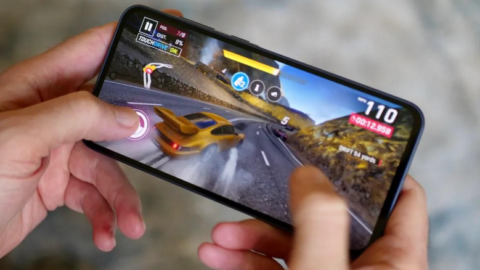
Asphalt Legends, formerly known as Asphalt 9: Legends, is a strong choice if you enjoy dramatic, high-speed racing rather than strict driving simulation.
The game features exotic cars, elaborate tracks, stunts, drifting, and nitro boosts. Its arcade style makes races feel energetic, with spectacular moments that are designed to entertain rather than reproduce every detail of real-world driving.
One of its attractions is the variety of vehicles and competitive activities. Players can progress through career content and explore multiplayer modes, depending on the current version and available events.
The game also provides TouchDrive, a control option designed to simplify steering decisions. This can help beginners get comfortable with the action before trying more hands-on controls.
Advantages:
- Exciting arcade-style racing.
- A wide selection of vehicles.
- Spectacular tracks and visual effects.
- Competitive multiplayer features.
- Control options suitable for different experience levels.
Things to consider: The game includes in-app purchases and advertisements. It also emphasises online features, so it may not be suitable if you want a racing game that works entirely offline. Check its current requirements before downloading.
Best for: Players who enjoy fast races, drifting, nitro boosts, and visually impressive arcade gameplay.
Download: Asphalt Legends on Google Play.
2. Need for Speed No Limits: Is It Worth Playing for Street Racing Fans?
Need for Speed No Limits is worth considering if you enjoy street racing, car upgrades, and customisation.
The game focuses on racing through an urban environment, competing in events, improving vehicles, and building a collection of cars. Its street-racing atmosphere gives it a different feel from games centred on professional racing circuits.
Customisation is an important part of the experience. Players can work towards improving their vehicles and changing their appearance as they progress.
The game can appeal to people who enjoy a sense of progression. Instead of simply completing isolated races, you have reasons to return, collect rewards, and develop your garage.
Advantages:
- Street-racing atmosphere.
- Vehicle upgrades and customisation.
- Career-style progression.
- Short races that fit mobile play.
- A recognisable racing franchise.
Things to consider: Progression may take time, and optional purchases are available. Electronic Arts describes the game on its official website, where you can also find its download link. Check the current Android requirements and connection needs before installing.
Best for: Players who enjoy street racing, tuning cars, and working towards new vehicles.
Official website: Need for Speed No Limits.
3. GRID Autosport: Is It a Good Choice for Realistic Racing?
If you prefer a more simulation-focused experience, GRID Autosport is worth investigating.
Unlike arcade racers that emphasise spectacular stunts, GRID Autosport focuses more on vehicle handling, braking, racing lines, and controlling a car around a track. The experience is designed for players who want a more traditional racing challenge.
Learning how to approach corners, brake at the right moment, and avoid losing control can be an important part of improving your performance.
The game is a paid title, so you should check its current price and supported-device information before purchasing it. Its Google Play listing identifies it as a realistic, single-player racing game and lists offline play.
Advantages:
- A more simulation-oriented driving experience.
- Track-based racing challenges.
- A focus on braking, steering, and handling.
- Single-player content.
- Offline play listed on Google Play.
Things to consider: It may be more demanding than lightweight arcade games, and its controls can take time to learn. Check device compatibility, storage requirements, and current pricing before buying.
Best for: Players who prefer track racing and more involved driving mechanics.
Download: GRID Autosport on Google Play.
4. CarX Street: Do You Want an Open-World Driving Experience?
CarX Street is an option for players who enjoy street racing alongside driving through a larger environment.
Rather than concentrating exclusively on short races, open-world racing games can give you a sense of freedom as you explore roads, discover activities, and develop your vehicles.
CarX Street also appeals to players interested in vehicle performance and drifting. Its style is different from a straightforward circuit racer because driving, customisation, and street-racing activities are part of the broader experience.
Advantages:
- Open-world-style driving.
- Street-racing activities.
- Car tuning and customisation.
- Opportunities to practise drifting.
- A different experience from traditional circuit racing.
Things to consider: More detailed environments can place greater demands on a phone’s hardware. Performance will vary by device, and some features may require an internet connection. The game also includes optional purchases.
Best for: Players who enjoy exploring, modifying cars, and participating in street-racing activities.
Before downloading, review the current CarX Street Google Play listing.
5. Hill Climb Racing: Which Racing Game Is Better for Casual Players?
Not every racing game needs realistic cars or complicated controls. Hill Climb Racing offers a more casual approach that focuses on driving across uneven terrain while trying to keep your vehicle under control.
Players navigate hills, jumps, and obstacles while managing acceleration and balance. The challenge comes from avoiding crashes, travelling as far as possible, and improving vehicles over time.
Its simple presentation makes it a useful alternative if you prefer a lighter game instead of a visually demanding racing simulator.
Advantages:
- Straightforward controls.
- Short, casual gameplay sessions.
- A focus on balance and vehicle handling.
- Vehicle upgrades and progression.
- An accessible alternative to realistic racing games.
Things to consider: Its physics-based gameplay is very different from conventional circuit racing. It may not appeal to players who want realistic sports cars and professional tracks. The game also includes advertising and optional purchases.
Best for: Casual gamers, beginners, and players who enjoy simple driving challenges.
Find it through Google Play’s racing games category.
6. CarX Drift Racing 3: Is It Suitable for Drifting Enthusiasts?
Drifting is a specialised driving style that involves controlling a car through a corner while the rear wheels lose traction in a deliberate slide.
CarX Drift Racing 3 is worth exploring if you want a game that places drifting at the centre of its experience rather than treating it as a secondary feature.
Players interested in drifting may enjoy learning how to initiate slides, control steering, and maintain a smooth line through corners. Vehicle setup and upgrades can also influence how the car behaves.
This type of game rewards practice. Simply accelerating as hard as possible is unlikely to produce consistently controlled drifts.
Advantages:
- Drifting-focused gameplay.
- Vehicle customisation options.
- Opportunities to practise cornering techniques.
- A specialised alternative to arcade racing.
- Challenges for players who enjoy mastering driving mechanics.
Things to consider: The controls may take time to master, and the current version’s requirements, monetisation, and availability should be checked before downloading.
Best for: Players who enjoy controlled slides, car tuning, and improving their drifting technique.
Search for the official listing: CarX Drift Racing 3 on Google Play.
7. Beach Buggy Racing 2: Is It a Fun Choice for Colourful Racing?
If you want something more playful than realistic car racing, Beach Buggy Racing 2 is another title to consider.
Kart-style racing games often combine simple controls, colourful tracks, and unusual obstacles. Rather than concentrating on realistic driving, they emphasise fun, surprises, and finding ways to finish ahead of other competitors.
This style can be suitable for players who want a more relaxed experience. It may also appeal to younger players, although parents should still check the age rating, advertising, and purchase options.
Advantages:
- Colourful environments.
- Accessible racing mechanics.
- A lighter alternative to simulation games.
- A variety of tracks and racing challenges.
- Gameplay suited to casual sessions.
Things to consider: Its kart-style design may not satisfy players seeking realistic vehicle handling. Check the current listing for compatibility and optional purchases.
Best for: Players who prefer fun, colourful, arcade-style competition.
Find it through Google Play’s racing games category.
8. Which Android Racing Game Is Best for Your Playing Style?
There is no single racing game that will be best for every Android user. The right choice depends on what you enjoy.
| If you want… | Consider… |
|---|---|
| High-speed arcade action | Asphalt Legends |
| Street racing and tuning | Need for Speed No Limits |
| More realistic track racing | GRID Autosport |
| Open-world-style driving | CarX Street |
| Casual hill-driving challenges | Hill Climb Racing |
| Drifting practice | CarX Drift Racing 3 |
| Colourful kart-style racing | Beach Buggy Racing 2 |
These are genre-based recommendations, not a guarantee that every title will suit your device. Availability, requirements, and features can vary by region and version.
9. How Can You Choose a Racing Game for a Low-End Android Phone?
If your phone has limited memory, processing power, or storage, choosing a compatible game is particularly important.
Start by checking the game’s requirements and recent user reviews. Look for repeated reports of crashes, overheating, or performance problems on devices similar to yours.
Consider the following practical steps:
Choose simpler graphics when necessary. Games with less demanding environments may be easier for an older device to run smoothly.
Lower graphics settings. If the game offers graphics or frame-rate options, try reducing visual effects before deciding that your phone cannot handle it.
Keep storage available. Large games may download additional content after installation. Leave enough free space for updates and other applications.
Close unnecessary applications. Freeing up memory before launching a demanding game may help in some circumstances.
Avoid overheating. Playing while charging, using maximum graphics for extended periods, or gaming in a hot environment can increase device temperature. Take breaks if the phone becomes unusually hot.
Check compatibility before purchasing. For paid games, confirm that your device is supported and review the refund terms applicable to your purchase.
If your main problem is stuttering rather than the game itself, read our Playvezio guide, How Can You Reduce Lag in Mobile Games on Android?
10. Can You Play Android Racing Games Without Internet?
Yes, some Android racing games offer offline play, but not all racing titles work without a connection.
A game may have a single-player mode that works offline while requiring internet access for multiplayer races, cloud saves, updates, or other features.
GRID Autosport lists offline play on Google Play. Other games may have different requirements depending on the version and mode you choose.
Before travelling or relying on offline play, open the game while connected to the internet, complete any required downloads, and test whether the relevant mode works with your connection disabled.
Remember that an offline mode does not mean you can skip all downloads or updates. Initial setup may still require internet access.
For more options across different genres, read our guide, Which Are the Best Offline Android Games to Play Without Internet?
11. Are Free Android Racing Games Really Free?
Many Android racing games can be downloaded without paying an upfront fee. However, free-to-play games may include advertisements, optional purchases, or progression systems that encourage spending.
For example, a game might let you earn vehicles through gameplay while offering purchases that speed up progression or unlock cosmetic items.
Before installing a game, review its store listing and ask yourself these questions:
- Does the game contain advertisements?
- Are there optional in-app purchases?
- Can you enjoy the main gameplay without spending money?
- Does the game require a constant internet connection?
- Is there enough storage available for additional content?
Avoid spending money simply because a limited-time event makes a purchase appear urgent. Decide on a budget beforehand if you intend to buy anything.
Parents should also review purchase settings and age ratings before allowing children to play games that include paid content.
Frequently Asked Questions
1. Which is the best Android racing game to play in 2026?
It depends on your preferences. Asphalt Legends is a good choice for arcade action, GRID Autosport suits players who prefer more realistic track racing, and Hill Climb Racing offers a simpler experience. Check compatibility and current features before installing.
2. Which Android racing games have realistic graphics?
GRID Autosport and CarX Street are worth investigating if you want detailed vehicles and environments. However, graphics quality and performance depend on the device, settings, and version.
3. Can I play racing games on an Android phone with limited storage?
Yes. Start by checking the installation requirements and choosing a game compatible with your available space. Simpler racing games may be a better starting point than large, detailed titles.
4. Are there Android racing games that work offline?
Yes. GRID Autosport lists offline play on Google Play. Other games may provide offline modes for some activities but still require internet for additional features. Check each game’s current listing and test it before travelling.
5. Do I need a controller to play Android racing games?
No. Many Android racing games are designed for touchscreen controls. A compatible controller may improve comfort for some players, but it is not essential unless a particular game or feature requires one.
6. Are free racing games safe to download?
Use official app stores, verify the developer, review permissions, and avoid unofficial modified versions. Check recent reviews and the game’s data-safety information before installing. No download source can guarantee that every application is completely risk-free.
7. Which racing game is suitable for beginners?
Hill Climb Racing is a useful starting point if you want simple controls and short challenges. Asphalt Legends may suit beginners who prefer faster arcade action and simplified steering options.
Conclusion
Android racing games offer something for nearly every kind of mobile gamer. You can enjoy high-speed arcade action with Asphalt Legends, explore street racing in Need for Speed No Limits, practise track driving in GRID Autosport, or try more casual challenges with Hill Climb Racing.
The best game for you depends on your preferred racing style, phone performance, available storage, internet access, and budget.
Before downloading, check the official store listing, read recent reviews, and make sure your device meets the requirements. If you prefer offline gaming or want to avoid optional purchases, investigate those details carefully rather than relying on a game’s promotional description alone.
At Playvezio.com, our goal is to help you discover useful gaming recommendations and make better decisions about what to play. Choose a racing game that fits your interests, practise your driving skills, and enjoy the experience at your own pace.